barcode-components
A set of Web Components for easily adding barcodes to webpages, by simply placing HTML elements like
<qr-code data="https://github.com"></qr-code>
in the HTML/DOM.
Usage examples
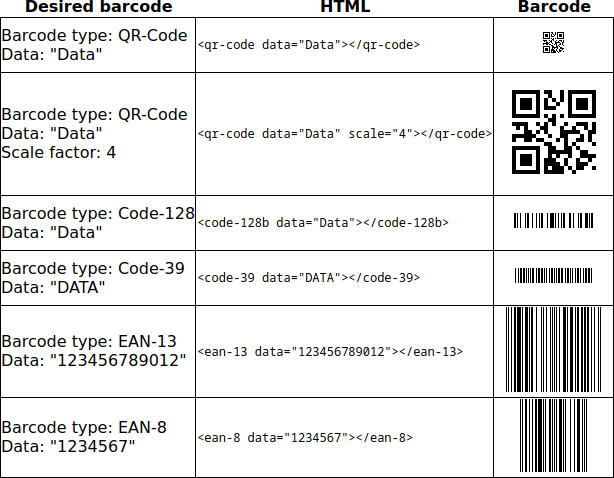
More usage examples (look at HTML code):
Supported barcode types
The following barcode types are currently supported:
- QR-Code
- Code 128 (Only code set B = Code 128B, the most commonly used code set that can encode all ASCII characters from 32 to 127)
- Code 39
- EAN-13
- EAN-8
Usage
Step 1: Include the Javascript file
Add…
<script src="https://oyooyo.github.io/barcode-components/barcode-components.min.js"></script> (for all available barcode types, ~24kB)
or
<script src="https://oyooyo.github.io/barcode-components/barcode-components-qrcode.min.js"></script> (for QR-Code only, ~18kB)
or
<script src="https://oyooyo.github.io/barcode-components/barcode-components-code128b.min.js"></script> (for Code 128B only, ~7kB)
or
<script src="https://oyooyo.github.io/barcode-components/barcode-components-code39.min.js"></script> (for Code 39 only, ~6kB)
or
<script src="https://oyooyo.github.io/barcode-components/barcode-components-ean13.min.js"></script> (for EAN-13 only, ~6kB)
or
<script src="https://oyooyo.github.io/barcode-components/barcode-components-ean8.min.js"></script> (for EAN-8 only, ~6kB)
…to the script section of your HTML/DOM.
Step 2: Place barcode elements
Place…
<qr-code data="<Data to encode in barcode>" scale="<Scale factor>"></qr-code> (for QR-Code)
or
<code-128b data="<Data to encode in barcode>" scale="<Scale factor>"></code-128b> (for Code 128B)
or
<code-39 data="<Data to encode in barcode>" scale="<Scale factor>"></code-39> (for Code 39)
or
<ean-13 data="<Data to encode in barcode, 12 or 13 digits>" scale="<Scale factor>"></ean-13> (for EAN-13)
or
<ean-8 data="<Data to encode in barcode, 7 or 8 digits>" scale="<Scale factor>"></ean-8> (for EAN-8)
…in your HTML/DOM wherever you want to show a barcode.
Be sure to always add the closing tag - self-closing tags (for example <qr-code />) are not possible.
Advanced topics
Altering attributes
When the attributes of an existing barcode element are changed, for example by calling
some_barcode_element.setAttribute("data", "<new_data>");
in Javascript, the barcode will automatically update/re-render.
ToDo
- Add way to specify the QR-Code error correction level
- Document undocumented configuration attributes
- Add some more configuration attributes
- Add more barcode types
Technology and compatibility
barcode-components uses Custom Elements and Shadow DOM and should work in more or less all recent webbrowsers.
Credits
The QR-Code encoder being used is a slightly modified version of Kazuhiko Arase’s QR-Code-Generator. Basically, just the unnecessary image creation parts were removed.